
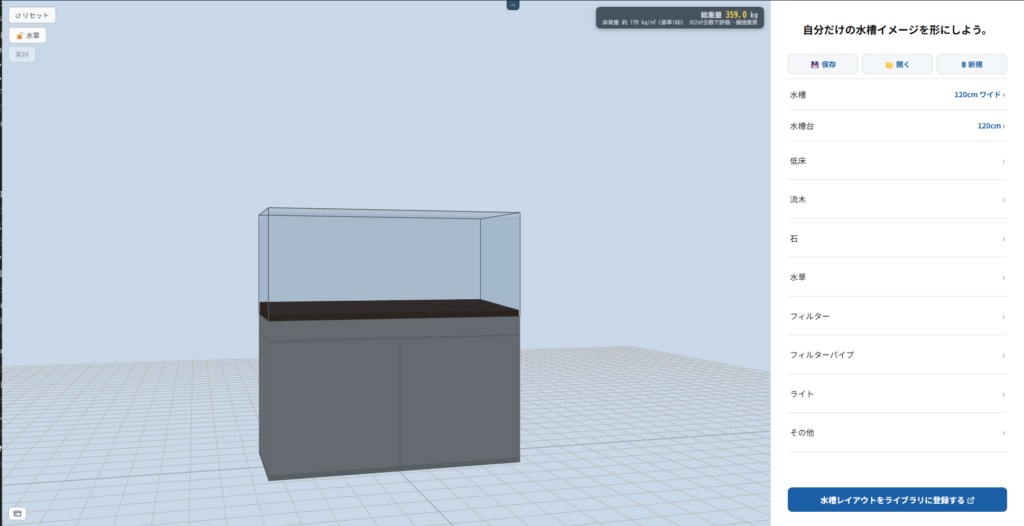
Thank you for using AquaDraft. This update is a major overhaul of the cabinet, replacing the previous simple box with a far more realistic representation. You can now visualize how your finished layout will actually look with a real cabinet underneath.
The Cabinet Is Now an Independent Piece of Furniture
Previously the cabinet shape was tied to the tank size, but it is now treated as its own independent piece of furniture.
- Choose the cabinet size (30 / 45 / 60 / 90 / 120 / 150 cm) independently from the tank
- Each size has real-unit depth and height based on actual product specs (e.g. the 120 cm model is W120×D50×H70 cm). Placing a small tank on a large cabinet renders a proper cabinet body — not a thin slab
- Cabinets smaller than the tank are greyed out. Enlarging the tank automatically bumps the cabinet to an appropriate size
Two Styles Available
We modeled two major cabinet design families found in the aquarium market, right down to their design details. No brand names, but both are inspired by real products.
- Style A: A trim, exact-width design. Clean flat doors with a distinct top panel line give it a minimal look.
- Style K: A panel band along the top and doors that multiply with width. Designed to be slightly wider than the tank.
Even with the same 120 cm tank, the cabinet style changes how the whole setup feels in a room. Try both before you buy.
6 Color Options
The cabinet color palette has been refreshed to six colors commonly seen on real aquarium cabinets.
- Silver / Black / White / Light Gray — smooth, solid-painted or laminate finish
- Light Brown / Brown — realistic wood-grain veneer texture
Solid colors like white and gray render without grain, while the wood tones show natural grain — matching how real cabinets look.
Linked to Weight & Budget Calculators
Changing the cabinet size or style instantly updates the total weight and floor load figures. When planning a large tank, you can check the combined weight and floor stress before you commit. The “Cabinet” row in the budget simulator also updates to match the selected size.
How to Use
Open “Cabinet” in the right panel and select size → style → color in order. The 3D preview updates instantly, so you can check the complete picture alongside your tank size, substrate, and layout.
We’ll keep improving AquaDraft with ease-of-use and real-world accuracy in mind. Send feedback or requests here.