
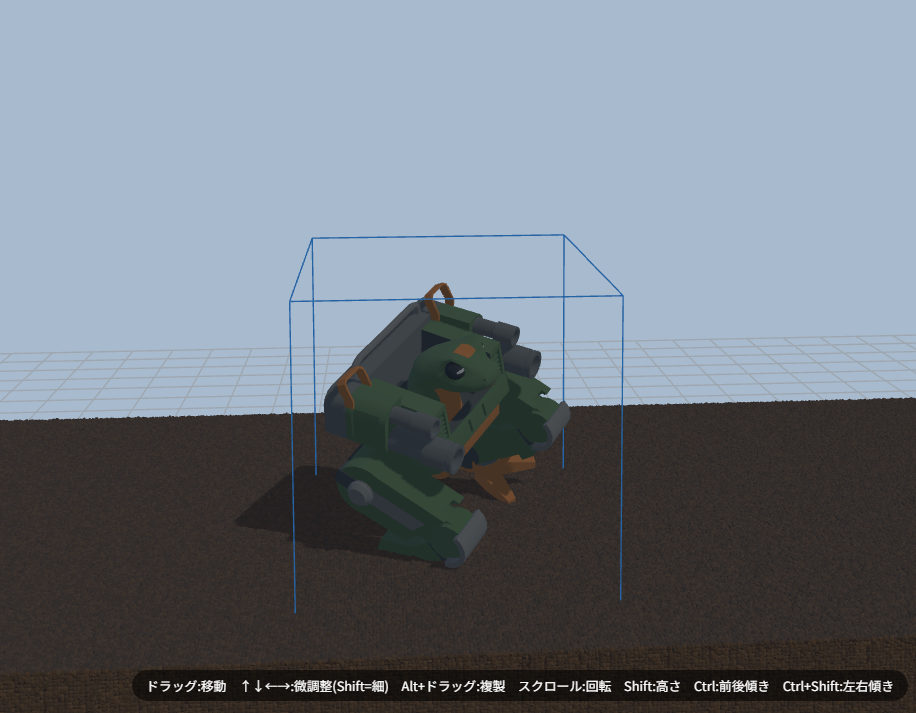
AquaDraft just got a new feature: “Custom Asset Import” — load a GLB-format 3D model file and place it freely anywhere in your tank layout.
Simulate how a Gunpla figure, a hand-built model, or any 3D object you like would look submerged in a tank. Great for planning underwater display setups too.
How to Use
- Open “Other” in the right panel
- Tap “Import Asset”
- Pick your file with the “Select GLB File” button
- The model appears automatically at the center of the tank
Once placed, scroll to resize it. Drag to reposition, or Shift+scroll to change height. It behaves just like regular rocks and driftwood.
Where to Find Free 3D Models?
Prepare your own GLB file. You can also model something in Blender, Fusion 360, or similar software and export it as GLB.
Important Notes
- Imported models are only available for the current browser session. They disappear when you close the tab.
- Saving the layout as JSON does not include the custom model. You’ll need to re-import it next time.
- Only GLB is supported (textures are bundled into a single file).
What Is GLB?
GLB is a format that packages a 3D model into a single file. You can export it from Blender or Godot. It works great in web browsers because textures (colors and patterns) are embedded directly in the file — just select it and it displays instantly.